Thursday, February 28, 2013


Wednesday, February 27, 2013
Click continuously on the screen then chose Wallpapers then you could chose from Live Wallpaper or Media Wallpaper most of the phones have already wallpapers and you could download wallpapers from Play Google as this app :

Tuesday, February 26, 2013
First of all you have to go to the settings and then move to Sound then to the notifications ringtone and chose any ringtone and make sure that your phone is not in a silent mode .


Monday, February 25, 2013
As we all know The Android have many amazing things you will never could imagine it !!! as the android kitchen here is the best kitchen and cooking apps :
Cooking Master

Bistro Cook

Pizza Maker - Cooking game

Ice Cream Maker- Cooking games

Cake Now-Cooking Games

Cooking Master
Bistro Cook
Pizza Maker - Cooking game
Ice Cream Maker- Cooking games
Cake Now-Cooking Games
Sunday, February 24, 2013
There are many icons in the main screen and the icon is a tiny copy from the applications , the icons may take a huge space from the main screen, anyway this special thing could make going to the app faster .
You could add icons to any screen by bushing your finger in the screen and then you could add any widget you want .

You could add icons to any screen by bushing your finger in the screen and then you could add any widget you want .

Saturday, February 23, 2013
1- APP Lock
Protect your applications using a password or pattern!!!

2- Gallery Lock Free
Safe Gallery protecting your privacy and managing the gallery

3- Screen Off and Lock
One click to turn off screen and lock device without touching power button

4- Lock Screen Widget
Locks your phone with one click iPhone-style

5- Smart Lock Free (App/Media)
Smart Lock (App/Photo/Video Lock) Privacy Protector

Protect your applications using a password or pattern!!!
2- Gallery Lock Free
Safe Gallery protecting your privacy and managing the gallery
3- Screen Off and Lock
One click to turn off screen and lock device without touching power button
4- Lock Screen Widget
Locks your phone with one click iPhone-style
5- Smart Lock Free (App/Media)
Smart Lock (App/Photo/Video Lock) Privacy Protector
Friday, February 22, 2013
When you don't use your android phone for a while time , automatically the phone will locked there are many different ways to unlock the android phone and that stand of the phone but the most of the android phones the center button is the main button to wake up the phone ! and then you could unlock it .
If you want to change your screen lock move to Locations & Security from the settings then move to Screen Lock and change your lock screen .

If you want to change your screen lock move to Locations & Security from the settings then move to Screen Lock and change your lock screen .
Thursday, February 21, 2013
Setting > wifi & Bluetooth ( turn them off if you don't use them )
Setting > Sound > Sound Level ( make less level)
Setting > Sound > Vibrate on ring ( switch off )
Setting > Sound > Vibrate on touch ( switch off )
Setting > Screen > Brightness ( make less level)
Setting > Screen > Sleep ( 15 Seconds )
Setting > Developer Options > Window animation Scale > Animation off
Setting > Developer Options > transition animation Scale > Animation off
Setting > Developer Options > Don't keep activities ( Switch on ) not Recommended
Setting > Sound > Sound Level ( make less level)
Setting > Sound > Vibrate on ring ( switch off )
Setting > Sound > Vibrate on touch ( switch off )
Setting > Screen > Brightness ( make less level)
Setting > Screen > Sleep ( 15 Seconds )
Setting > Developer Options > Window animation Scale > Animation off
Setting > Developer Options > transition animation Scale > Animation off
Setting > Developer Options > Don't keep activities ( Switch on ) not Recommended

Wednesday, February 20, 2013
HERE IS THE BEST 5 GAMES IN MY POINT OF VIEW :D
1-
2-
3-Temple Run 2
4-Subway Surfers

5- Angry Birds

1-
2-
3-Temple Run 2
4-Subway Surfers
5- Angry Birds
Tuesday, February 19, 2013
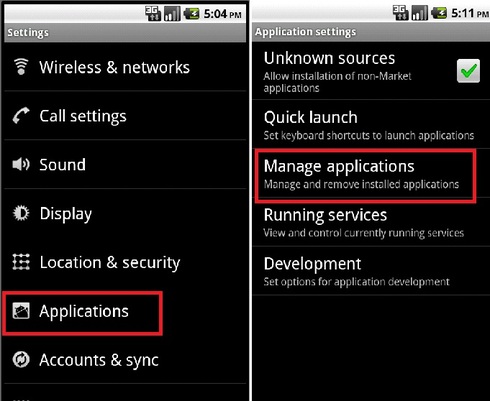
If you changer your mind about an app you had download it , you could uninstall it . Go to the My apps part from the store ( or you could move to Settings then Applications then Manage applications ) then you could easily Uninstall any app you want .
But about the paid apps if you don't uninstall it for 24 hrs you will never get your money back.
But about the paid apps if you don't uninstall it for 24 hrs you will never get your money back.
Monday, February 18, 2013
The Android system as usual update the apps automatically , whenever this afternoon to app bar will display alerts to tell you that there is an update available

Sunday, February 17, 2013
World of Android is an open system, does not require the developers to use the play store in the distribution of their apps but they could share their apps in other websites or in other markets , if you use the pc or the laptop then you have to use the USP cable .

Saturday, February 16, 2013
If you decide to buy an app move to selling page and click to "buy" as the free apps and the downloading will start after you pay the app the play store will check if want to buy the app .
And after this the play store will show you a box to put the number of your card ,write it and enjoy the app .


And after this the play store will show you a box to put the number of your card ,write it and enjoy the app .
Friday, February 15, 2013
The most of android applications are free in the play store and the amazing thing in the play store is 70% of the applications are free compared with any smartphone store when you download any app in the store the bar alert will tell you and then you could enjoy with the app


Wednesday, February 13, 2013
If you are looking for application , you could use the search button , write the name of the app in the search button then click and you will find it .

Tuesday, February 12, 2013
Play Store is the one of the best or I have to say it is the best android store , you can access to the market at any time , you can see the best applications in the basic screen as games or programs or looking for applications , the market is divided into Top Paid , Top Free , Top New Paid Apps and Top New Apps and each program is displayed in his name and the name of its designer, price and evaluate users.
When you click on any app details page will appear programs and you could click Back to return to the main screen of the store .

When you click on any app details page will appear programs and you could click Back to return to the main screen of the store .


